
Loading
Smart Home — Touch Control Screens
UGX 5,000,000
Standard
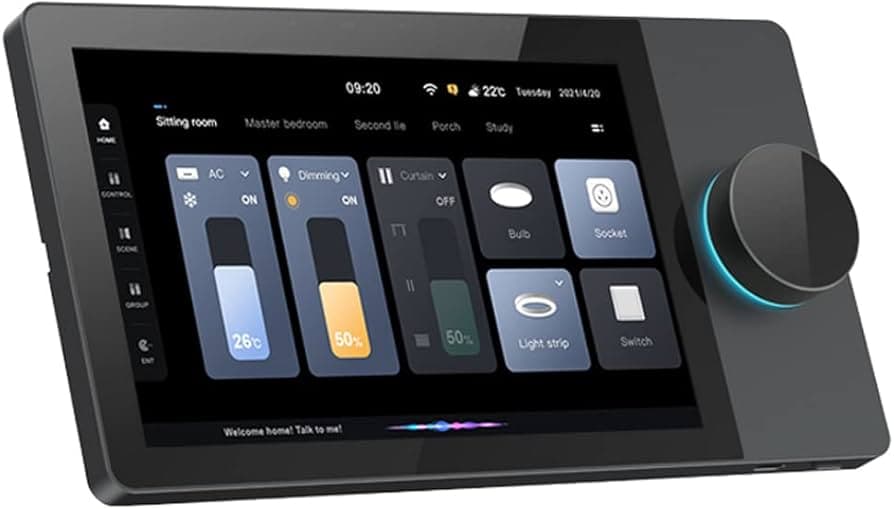
Touch Control Screens
Smart Home — Touch Control Screens are the fixed control points that let someone control the home without searching for a phone. They can sit on a wall, table dock, or central room position depending on the model. The key value is convenience: lights, audio, curtains, scenes, climate, security, and other smart-home functions can be accessed from one clear screen in a predictable place.
Price
USh 5,000,000
Select option
Delivery in Kampala usually takes 2 to 4 days.
Pay by MTN MoMo, Airtel Money, or cash on delivery.
What this product does well and why it fits the setup.
Smart Home — Touch Control Screens are the fixed control points that let someone control the home without searching for a phone. They can sit on a wall, table dock, or central room position depending on the model. The key value is convenience: lights, audio, curtains, scenes, climate, security, and other smart-home functions can be accessed from one clear screen in a predictable place.
Smart Home — Touch Control Screens are the fixed control points that let someone control the home without searching for a phone. They can sit on a wall, table dock, or central room position depending on the model. The key value is convenience: lights, audio, curtains, scenes, climate, security, and other smart-home functions can be accessed from one clear screen in a predictable place.
Phone apps are useful, but they are personal. A wall or tabletop control screen is shared by the home, hotel room, office, or boardroom. Guests, children, staff, or family members can adjust common controls without needing the owner's phone or login. That matters in lounges, bedrooms, kitchens, boardrooms, apartments, villas, hospitality rooms, and reception spaces where control should be simple and available to everyone allowed to use the space.
A touch screen is only useful if it matches the smart-home system behind it. Some panels are made for Control4, others for Crestron, KNX, Android-based control, proprietary building automation, or custom dashboards. Before installation, the exact platform must be confirmed. Do not assume any screen can control any smart home. The controller, software, network, drivers, and configured scenes must all work together.
Touch screens should be planned before wall finishing where possible. The installer needs to know whether the panel uses PoE, low-voltage power, WiFi, Ethernet, a wall box, or a docking station. Cable route, mounting height, wall depth, network access, and service access all affect the final installation. A neat smart-home control screen is not just about the display; it is about power, network, and programming being handled properly.
Before this product is published publicly, confirm the exact brand and model. The content here is category-based because this is a broad smart-home control screen product. If the item is a Control4 touchscreen, Crestron touchscreen, KNX panel, Android wall panel, Tuya-style smart panel, or another automation display, the specs and descriptions must be adjusted to match the exact unit before publishing.
Technical details at a glance.
Product Category
Touch Control Screens
Smart-home touch control screen
Verification Status
Touch Control Screens
Category reference; exact model not confirmed
System Role
Touch Control Screens
Fixed interface for controlling smart-home scenes, lighting, audio, curtains, climate, security, and other integrations
Typical Mounting
Touch Control Screens
Wall-mounted, tabletop docked, or room control position depending on model
Platform Compatibility
Touch Control Screens
Unconfirmed — verify Control4, Crestron, KNX, Android, Tuya, or other automation platform
Power Method
Touch Control Screens
Unconfirmed — verify PoE, low-voltage DC, mains adapter, battery dock, or platform-specific power
Network Method
Touch Control Screens
Unconfirmed — verify Ethernet, WiFi, KNX bus, or proprietary connection
Reference Example 1
Touch Control Screens
Control4 8-inch and 10-inch touchscreens for whole-home communication and control
Reference Example 2
Touch Control Screens
Crestron TSW-1070: 10.1-inch capacitive touchscreen with 1920 x 1200 WUXGA resolution
Reference Features
Touch Control Screens
PoE/WiFi, programmable controls, proximity wake sensor, microphone/speakers, and streaming video support on Crestron TSW reference model
Installation Planning
Touch Control Screens
Confirm wall box, mounting height, cable route, network access, and service access before wall finishing
Recommended Use
Touch Control Screens
Homes, apartments, villas, hotels, boardrooms, lounges, reception areas, offices, and smart-room control points
Not Recommended For
Touch Control Screens
Standalone automation without a compatible controller, software, network, and configured devices
Publishing Note
Touch Control Screens
Confirm exact brand, model, screen size, power method, platform, and supported integrations before public publishing
Final purchase guidance and support information.
Need help before checkout? Talk to the team on WhatsApp for purchase guidance and product confirmation.